项目链接:https://github.com/AlexeyAB/darknet
一、如何在命令行中使用编译好的darknet程序
On Linux use ./darknet instead of darknet.exe, like this:./darknet detector test ./cfg/coco.data ./cfg/yolov4.cfg ./yolov4.weights
On Linux find executable file ./darknet in the root directory, while on Windows find it in the directory \build\darknet\x64
- Yolo v4 COCO - image:
darknet.exe detector test cfg/coco.data cfg/yolov4.cfg yolov4.weights -thresh 0.25 - Output coordinates of objects:
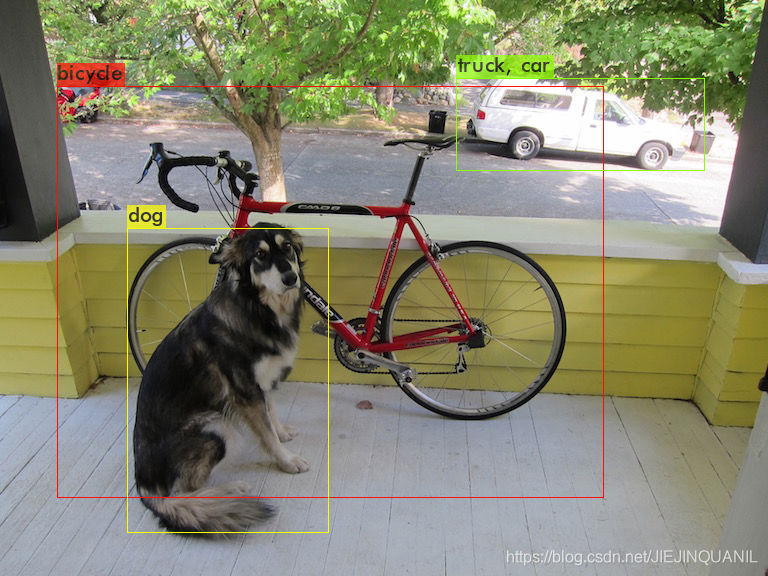
darknet.exe detector test cfg/coco.data yolov4.cfg yolov4.weights -ext_output dog.jpg
- Yolo v4 COCO - video:
darknet.exe detector demo cfg/coco.data cfg/yolov4.cfg yolov4.weights -ext_output test.mp4 - Yolo v4 COCO - WebCam 0:
darknet.exe detector demo cfg/coco.data cfg/yolov4.cfg yolov4.weights -c 0 - Yolo v4 COCO for net-videocam - Smart WebCam:
darknet.exe detector demo cfg/coco.data cfg/yolov4.cfg yolov4.weights http://192.168.0.80:8080/video?dummy=param.mjpg - Yolo v4 - save result videofile res.avi:
darknet.exe detector demo cfg/coco.data cfg/yolov4.cfg yolov4.weights test.mp4 -out_filename res.avi
- Yolo v3 Tiny on GPU #1:
darknet.exe detector demo cfg/coco.data cfg/yolov3-tiny.cfg yolov3-tiny.weights -i 1 test.mp4
- To process a list of images data/train.txt and save results of detection to result.json file use:
darknet.exe detector test cfg/coco.data cfg/yolov4.cfg yolov4.weights -ext_output -dont_show -out result.json < data/train.txt - To process a list of images data/train.txt and save results of detection to result.txt use:
darknet.exe detector test cfg/coco.data cfg/yolov4.cfg yolov4.weights -dont_show -ext_output < data/train.txt > result.txt
- To calculate anchors:
darknet.exe detector calc_anchors data/obj.data -num_of_clusters 9 -width 416 -height 416
- To check accuracy mAP@IoU=50:
darknet.exe detector map data/obj.data yolo-obj.cfg backup\yolo-obj_7000.weights - To check accuracy mAP@IoU=75:
darknet.exe detector map data/obj.data yolo-obj.cfg backup\yolo-obj_7000.weights -iou_thresh 0.75
二、How to train (to detect your custom objects)
1、关于预训练模型:
- for
yolov4.cfg, yolov4-custom.cfg(162 MB): yolov4.conv.137 (Google drive mirror yolov4.conv.137 ) - for
yolov4-tiny.cfg, yolov4-tiny-3l.cfg, yolov4-tiny-custom.cfg(19 MB): yolov4-tiny.conv.29 - for
csresnext50-panet-spp.cfg(133 MB): csresnext50-panet-spp.conv.112 - for
yolov3.cfg, yolov3-spp.cfg(154 MB): darknet53.conv.74 - for
yolov3-tiny-prn.cfg , yolov3-tiny.cfg(6 MB): yolov3-tiny.conv.11 - for
enet-coco.cfg (EfficientNetB0-Yolov3)(14 MB): enetb0-coco.conv.132
2、关于.cfg文件的修改:
- change line batch to
batch=64 - change line subdivisions to
subdivisions=16 - change line max_batches to (
classes*2000, but not less than number of training images and not less than6000), f.e.max_batches=6000if you train for 3 classes - change line steps to
80% and 90%of max_batches, f.e.steps=4800,5400 - set network size
width=416 height=416or any value multiple of32 - change line
classes=80to your number of objects in each of3 [yolo]-layers - change
[filters=255]tofilters=(classes + 5)x3in the 3 [convolutional] before each[yolo]layer, keep in mind that it only has to be the last[convolutional]before each of the[yolo]layers - when using
[Gaussian_yolo]layers, change[filters=57]filters=(classes + 9)x3in the 3[convolutional]before each[Gaussian_yolo]layer
So if classes=1 then should be filters=18. If classes=2 then write filters=21.
(Do not write in the cfg-file: filters=(classes + 5)x3)
3、开始训练
Start training by using the command line: darknet.exe detector train data/obj.data yolo-obj.cfg yolov4.conv.137
4、训练结果(权重)保存
- (file
yolo-obj_last.weightswill be saved to the build\darknet\x64\backup\ for each 100 iterations) - (file
yolo-obj_xxxx.weightswill be saved to the build\darknet\x64\backup\ for each 1000 iterations)
5、训练过程设置
- (to disable Loss-Window use
darknet.exe detector train data/obj.data yolo-obj.cfg yolov4.conv.137 -dont_show, if you train on computer without monitor like a cloud Amazon EC2)
- (to see the mAP & Loss-chart during training on remote server without GUI, use command
darknet.exe detector train data/obj.data yolo-obj.cfg yolov4.conv.137 -dont_show -mjpeg_port 8090 -mapthen open URLhttp://ip-address:8090in Chrome/Firefox browser)
After each 100 iterations you can stop and later start training from this point. For example, after 2000 iterations you can stop training, and later just start training using: darknet.exe detector train data/obj.data yolo-obj.cfg backup\yolo-obj_2000.weights
6、注意事项
Note: If during training you see nan values for avg (loss) field - then training goes wrong, but if nan is in some other lines - then training goes well.
Note: If you changed width= or height= in your cfg-file, then new width and height must be divisible by 32.
Note: After training use such command for detection: darknet.exe detector test data/obj.data yolo-obj.cfg yolo-obj_8000.weights
Note: if error Out of memory occurs then in .cfg-file you should increase subdivisions=16, 32 or 64
三、什么时候应该停止训练?
Usually sufficient 2000 iterations for each class(object), but not less than number of training images and not less than 6000 iterations in total. But for a more precise definition when you should stop training, use the following manual:
1、During training, you will see varying indicators of error, and you should stop when no longer decreases 0.XXXXXXX avg:
Region Avg IOU: 0.798363, Class: 0.893232, Obj: 0.700808, No Obj: 0.004567, Avg Recall: 1.000000, count: 8 Region Avg IOU: 0.800677, Class: 0.892181, Obj: 0.701590, No Obj: 0.004574, Avg Recall: 1.000000, count: 8
9002: 0.211667, 0.60730 avg, 0.001000 rate, 3.868000 seconds, 576128 images Loaded: 0.000000 seconds
9002- iteration number (number of batch)0.60730avg - average loss (error) -the lower, the better
When you see that average loss 0.xxxxxx avg no longer decreases at many iterations then you should stop training. The final average loss can be from 0.05 (for a small model and easy dataset) to 3.0 (for a big model and a difficult dataset).
Or if you train with flag -map then you will see mAP indicator Last accuracy mAP@0.5 = 18.50% in the console - this indicator is better than Loss, so train while mAP increases.
2、Once training is stopped, you should take some of last .weights-files from darknet\build\darknet\x64\backup and choose the best of them:
For example, you stopped training after 9000 iterations, but the best result can give one of previous weights (7000, 8000, 9000). It can happen due to over-fitting. Over-fitting - is case when you can detect objects on images from training-dataset, but can’t detect objects on any others images. You should get weights from Early Stopping Point:
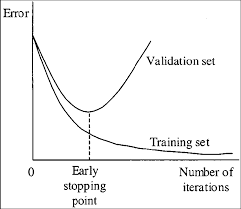
To get weights from Early Stopping Point:
2.1. At first, in your file obj.data you must specify the path to the validation dataset valid = valid.txt (format of valid.txt as in train.txt), and if you haven’t validation images, just copy data\train.txt to data\valid.txt.
2.2 If training is stopped after 9000 iterations, to validate some of previous weights use this commands:
(If you use another GitHub repository, then use darknet.exe detector recall… instead of darknet.exe detector map…)
darknet.exe detector map data/obj.data yolo-obj.cfg backup\yolo-obj_7000.weights
darknet.exe detector map data/obj.data yolo-obj.cfg backup\yolo-obj_8000.weights
darknet.exe detector map data/obj.data yolo-obj.cfg backup\yolo-obj_9000.weights
And compare last output lines for each weights (7000, 8000, 9000):
Choose weights-file with the highest mAP (mean average precision)or IoU (intersect over union)
For example, bigger mAP gives weights yolo-obj_8000.weights - then use this weights for detection.
版权声明:本文为CSDN博主「耐心的小黑」的原创文章,遵循CC 4.0 BY-SA版权协议,转载请附上原文出处链接及本声明。
原文链接:https://blog.csdn.net/qq_39507748/article/details/116664428

![[Python]Cityscapes目标检测标注转YOLO格式](https://sup.51qudong.com/wp-content/uploads/csmbjc/20201215211922883.png?imageMogr2/thumbnail/!300x300r|imageMogr2/gravity/Center/crop/300x300)